Infrastructure / Zero to Homelab · Episode 2
Two Nodes, One Lesson in Constraint
The plan that did not survive contact with reality
The original design had four nodes.
A network node for the firewall, DNS, and routing. A compute node for general workloads. A storage node for data-heavy services and ZFS pools. A backup node running Proxmox Backup Server and a Borg endpoint for host-level datasets.
Each had a clear role. The separation was clean on paper. The first three would run Proxmox Virtual Environment, the fourth Proxmox Backup Server as its primary OS.
It did not last.
Why four became two
The problem was power consumption. With all four nodes online, the homelab drew over 400 watts continuously. For a residential setup running 24/7, that is not a minor detail. It is a recurring cost that forces a conversation about what the infrastructure actually needs versus what it would be nice to have.
The first thing to go was the compute node. Its workloads were not demanding enough to justify a dedicated machine. I migrated everything onto the storage node, which had the physical capacity for it, and upgraded its CPU from an Intel N150 to an AMD Ryzen 7 PRO 8845HS with 96 GB of RAM. The storage node became the general-purpose workhorse: compute, storage, and most services on a single machine.
The backup node followed. The original idea was to power it on only when needed, run the backup jobs, then shut it down. In practice, managing scheduled wake-ups and ensuring consistency across timed operations added complexity that was not worth the savings. The simpler answer was a Proxmox Backup Server VM running on the storage node, with its data sitting in a dedicated ZFS dataset with constrained quotas. The bulk of the backup capacity, following a 3-2-1 strategy, lives offsite on S3-compatible object storage. But backup deserves its own episode.
The result is two nodes running Proxmox VE. Power consumption dropped from over 400 watts to around 120.
Power was not the only physical constraint. The previous server, a single machine running OpenMediaVault with eight mechanical drives, lived in the living room. The noise was constant and impossible to ignore. The current setup sits in an attic room, well away from living and sleeping areas, which solved the proximity problem entirely. But the choice of CPUs, a laptop-class Ryzen 8845HS for the storage node and an efficiency-oriented N150 for the network node, was driven as much by thermal output and fan noise as by power draw. The network node uses a large passive heatsink with a fan that only spins under sustained load, which is rare. The storage node runs Noctua fans throughout, including supplementary ones to keep temperatures manageable during summer. Less heat means less cooling. Less cooling means less noise. The same constraint, approached from three angles.
The two nodes
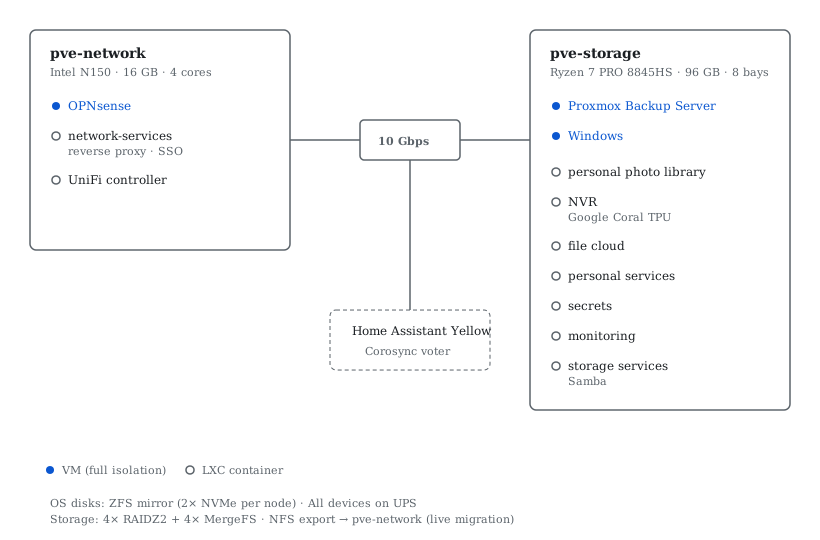
Both nodes share a few baseline design choices. The Proxmox OS disk on each is a ZFS mirror across two NVMe drives, so that a single drive failure does not take down the host. This was a deliberate decision from the original four-node design, carried forward into the current layout. All devices, both nodes, the Home Assistant Yellow, the inter-node switch, and the active network equipment, sit behind a UPS. The two nodes and the Yellow are connected through the same 10 Gbps switch, which matters less for daily operations than for live migration and backup traffic when they occur.
pve-network
This is the network node. An Intel N150 with 16 GB of RAM, four cores, modest in every respect.
It runs three things: OPNsense as a virtual machine, a UniFi controller LXC for wireless management, and a network-services LXC that hosts the reverse proxy and the identity provider. Episode 1 covered why the firewall is virtualized and what that entails. The point here is different: this node exists because its power draw is low enough to justify keeping it permanently on, and its workload is stable enough that it rarely needs attention.
The N150 is not powerful. It does not need to be. Routing, DNS resolution, VPN termination, and reverse proxying are not computationally expensive. What matters is that the network layer is physically and logically independent from everything else. If the storage node goes down for maintenance, the network stays up. If a container on the storage node misbehaves and consumes all available resources, the firewall and reverse proxy are unaffected.
This is the same separation of concerns described in Episode 1, but at the hardware level.
pve-storage
This is where everything else runs. An AMD Ryzen 7 PRO 8845HS with 96 GB of RAM and eight HDD bays.
The eight bays were the reason this node could absorb the roles of the others. Four of those bays currently hold the RAIDZ2 pool that provides the primary storage for service data and local backups. The remaining four host two MergeFS pools used for temporary and transient files. The disks recovered from the decommissioned backup node will likely expand the RAIDZ2 pool in the future, but there is no immediate need.
The CPU upgrade was necessary once the node started hosting compute workloads that the N150 could never have handled: machine learning inference for the photo library, and an NVR with a Google Coral TPU for object detection.
This node hosts two VMs (Proxmox Backup Server and a Windows machine for a specific use case) and several LXC containers, each dedicated to a functional domain.
The third device
There is a third device in the cluster, though it is not a Proxmox node.
A Home Assistant Yellow sits alongside the two servers. It runs Home Assistant for home automation, but it also serves an infrastructure purpose: it hosts a Corosync instance that provides the quorum vote needed for the Proxmox cluster to function correctly with only two nodes.
A two-node Proxmox cluster has a fundamental problem: if one node goes down, the surviving node cannot establish quorum on its own, which limits its ability to manage cluster resources. Adding a third Corosync voter solves this without adding a third hypervisor.
I could have virtualized Home Assistant on one of the Proxmox nodes. But I already had the Yellow, it consumes very little power, and keeping home automation on a separate physical device means it remains operational during Proxmox maintenance or outages. The Yellow runs on an M.2 SSD rather than a microSD or eMMC, a deliberate choice given that it now carries a cluster-level responsibility. When the servers are down for updates, the lights still work. That felt like the right trade-off.
How the pieces fit together
Choosing the hypervisor
Proxmox was not the result of a comparative evaluation. It was the natural next step from where I was.
Before the multi-node setup, I ran a single server with OpenMediaVault. OMV gave me a Docker Compose plugin for services and a KVM plugin for the occasional virtual machine. It worked, but it was clearly designed as a NAS operating system with virtualization bolted on, not as a hypervisor with storage capabilities built in.
Proxmox offered what OMV could not: native ZFS integration, a proper backup system with Proxmox Backup Server, support for live migration between nodes, and the possibility of experimenting with high availability. It runs on Debian, which means that when something breaks, the debugging tools are standard and the filesystem is accessible. That mattered more than any feature comparison.
The storage node also exposes an NFS share to the network node, which enables live migration of containers between hosts when needed. This is not something I use routinely, but it means maintenance on one node does not require shutting down everything that runs on it.
When a VM, when a container
This is the decision that shapes the entire compute layer.
Proxmox supports both full virtual machines (KVM) and Linux containers (LXC). They solve different problems, and confusing the two leads to designs that are either wasteful or fragile.
A VM gets its own kernel. It is fully isolated from the host. It can run a different operating system. It carries overhead: memory for the guest kernel, CPU cycles for hardware emulation, a virtual disk that adds a layer between the application and the physical storage.
An LXC container shares the host kernel. It is lighter, faster to start, and uses fewer resources. But it cannot run a different OS, and the isolation boundary is thinner. A misconfigured container can, in certain scenarios, affect the host in ways a VM cannot.
My default choice is LXC. The reasoning is straightforward: the CPUs in this setup are adequate but not overpowered, power consumption is a constant constraint, and every layer of overhead that can be removed should be, unless there is a specific reason to keep it. LXC containers start in seconds, consume only the memory their processes actually use, and are simpler to manage and template. For the workloads I run, the reduced isolation compared to a full VM is an acceptable trade-off, assessed against the actual risk profile of each service. Nearly all containers run unprivileged. The one exception requires limited privileges to pass through the AMD integrated GPU and a TUN device, which the kernel will not map correctly to an unprivileged container regardless of how creative you get with device permissions. I spent weeks confirming this.
The exceptions are few and justified. OPNsense runs as a VM because it is FreeBSD and requires direct access to network interfaces via PCI passthrough. Proxmox Backup Server runs as a VM because it manages its own storage independently and benefits from the stronger isolation boundary. A Windows VM exists for a specific use case that requires it.
Everything else is an LXC container running Docker Compose stacks. The container provides the OS environment and the network identity. Docker provides the application layer.
The data problem
Here is a question that does not get discussed enough in homelab content: where do your datasets actually live?
Consider a personal photo library managed by Immich. Or a file repository served by Nextcloud. These are large, growing datasets. They are the reason the infrastructure exists. The services that operate on them are replaceable. The data is not.
The naive approach is to put everything inside the container's virtual disk. This is simple, and it works until it does not. The virtual disk is a file on the host filesystem. If it grows, ZFS cannot manage the individual blocks inside it. If a bit flips inside the virtual disk, ZFS sees the outer file as intact, the corruption is invisible to the host's integrity checks. Preallocating large virtual disks wastes space. Thin provisioning avoids that, but adds complexity and fragmentation.
I chose a different approach. The datasets that matter, photos, cloud storage files, media libraries, live directly on ZFS at the host level. Each dataset has its own ZFS filesystem with appropriate properties: compression, record size, quota. This means ZFS can protect them with its own checksumming and scrubbing, independently of whatever is running inside the container.
These datasets are then exposed where they are needed. For LXC containers, this is a bind mount: the host directory appears inside the container's filesystem directly, with no virtualization layer in between. For the few cases where a VM needs access, NFS provides the bridge. A dedicated storage-services container also runs a Samba server, sharing selected directories to devices on the local network. This is one of the few services that runs outside Docker, directly on the container OS, because the overhead of containerizing a file-sharing daemon that operates on bind-mounted host paths added complexity without benefit.
The result is that the service layer and the data layer are decoupled. I can destroy and recreate a container without touching its data. I can snapshot and replicate the datasets independently. I can move a dataset to a different pool or a different RAID configuration without the service knowing.
This is not a minor architectural detail. It is the decision that makes everything else sustainable.
LXC containers as service hosts
After various experiments, the operating model settled on thematic LXC containers, each hosting one or more related Docker Compose stacks.
The grouping is functional, not arbitrary. Services that share data dependencies or network requirements are colocated. Services with distinct security profiles are separated. The NVR, for instance, runs alone because it needs access to a Google Coral TPU for inference and operates in a network segment isolated from everything else.
Each GitOps-managed container is built from a common template. The template includes Docker, the deploy tooling, and the SSH configuration needed for the GitOps pipeline to operate. This means spinning up a new service container is a matter of cloning the template, assigning it to the correct network segment, and adding a stacks entry. The deploy pipeline handles the rest. But the pipeline itself is the subject of Episode 3.
What I would not do again
A dedicated backup node designed to run only intermittently. The coordination cost of scheduled wake-ups, consistency checks, and state synchronization across power cycles was higher than the cost of running a lightweight VM full-time. Simpler won.
Defaulting to VMs before understanding the actual isolation requirements. The overhead is real, and for most self-hosted services behind a reverse proxy, the risk profile does not justify it. LXC-first, with explicit exceptions, would have been the right starting point.
Over-separating roles across physical hardware without measuring whether the workloads justified the separation. A clean diagram is not the same as a good architecture. The constraint that matters is the one you pay for every month, not the one that looked elegant on day one.
What the consolidation taught me
The evolution from four nodes to two was not a failure of planning. It was planning meeting reality.
The original design optimized for separation. The final design optimizes for sustainability. A homelab that costs too much to run will eventually be turned off. A homelab with too many moving parts will eventually be neglected. Neither outcome serves the purpose of having one.
The interesting lesson is that the consolidation did not reduce capability. It reduced waste. The two-node architecture still maintains the separation that matters: the network layer is independent from the compute layer. What it eliminated was the separation that did not pay for itself: a dedicated compute node with idle capacity, a backup node that was only useful intermittently.
In enterprise contexts, this trade-off is rarely visible. Hardware exists in racks that someone else pays for. Power is a line item in a budget that someone else manages. In a homelab, every watt is yours. That constraint forces a clarity about what actually needs to be separate and what is separate only because a diagram looked cleaner that way.
This is, incidentally, one of the more transferable insights. Not every system that could be distributed should be. Not every service that could have its own host needs one. The right architecture is the one that survives contact with its operating environment, not the one that looks best before deployment.